Offline chat
Ask questions, draft, brainstorm, and work with a local language model without depending on an internet connection.
An AI assistant that runs on your own PC. Write, organize, work on projects and keep your conversations local — without needing a cloud account.
FriedrichAI keeps the core experience on your own hardware, with extra tools when you need them.
Ask questions, draft, brainstorm, and work with a local language model without depending on an internet connection.
Keep local chats, search your history and return to previous work.
Organize your work with projects, a Kanban board, documents and a project chronicle.
Retain useful context on your machine instead of relying on a cloud account.
Use the included local model or switch to compatible GGUF models.
Add supported image, video or audio packs when your hardware is up to the job. Feature compatibility varies.
A practical desktop workspace for local AI, conversations, and projects.
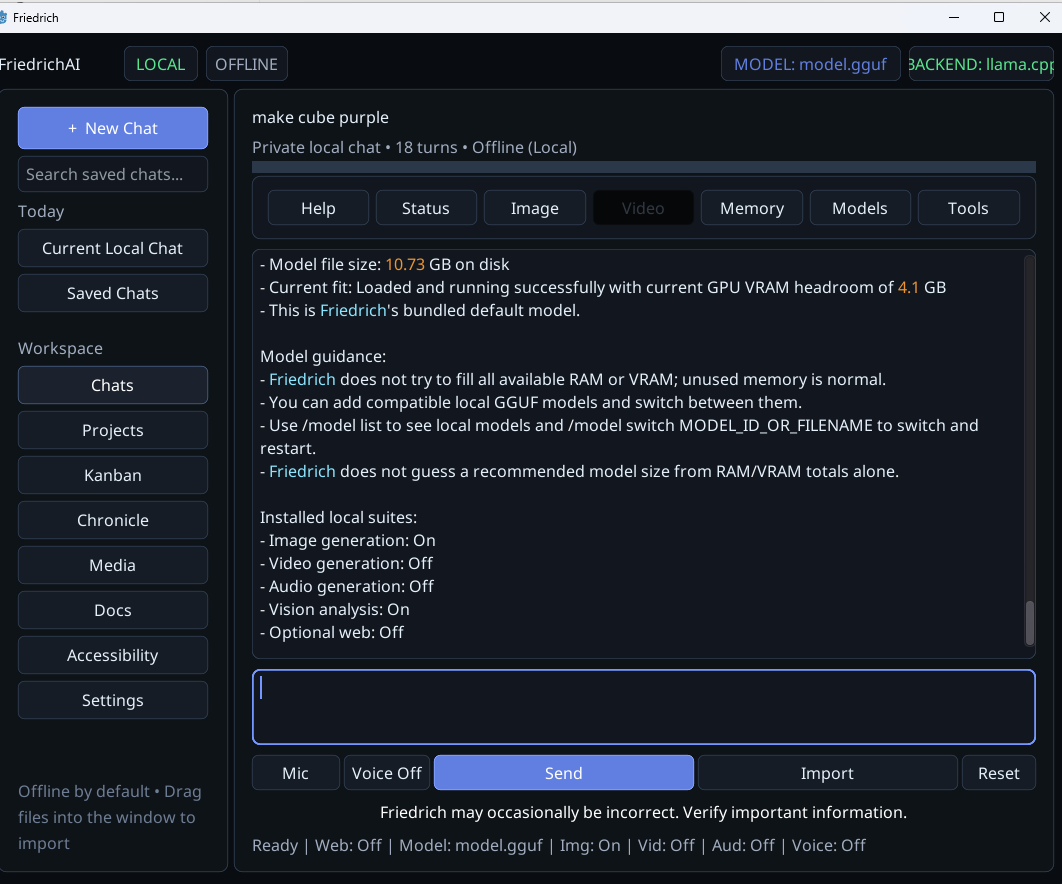
Actual application screenshot. Features and performance depend on your installation and hardware.
Your core assistant runs on your machine. Local chats, memory and workspace data are designed to stay under your control.
Optional web functionality is separate and only used when you enable and configure it. The default experience does not require an API key.
Read our privacy approach →Because the AI runs locally, model speed and optional media features depend on your system. Try the free Steam demo if you're unsure.
Image, video and audio generation are optional, GPU-intensive features. AMD and Intel support may differ by feature and build. Check Steam requirements before installing optional media packs.
No. The main assistant works locally and offline after installation. Optional web features require connectivity and may require your own provider configuration.
Yes. A free demo is available from the Steam store page. It is a compatibility snapshot rather than the continuously updated full application.
No. FriedrichAI runs models locally, so memory, GPU capability, model size, and storage affect whether a particular setup will run well. Compare your PC with the system requirements first.
Supported media capabilities are offered through optional Steam packs. They have separate hardware and compatibility needs, and not every workflow works on every GPU.
Yes. FriedrichAI supports switching among compatible local GGUF models, subject to hardware and model compatibility.
No required cloud. No required account. Your machine, your workspace.